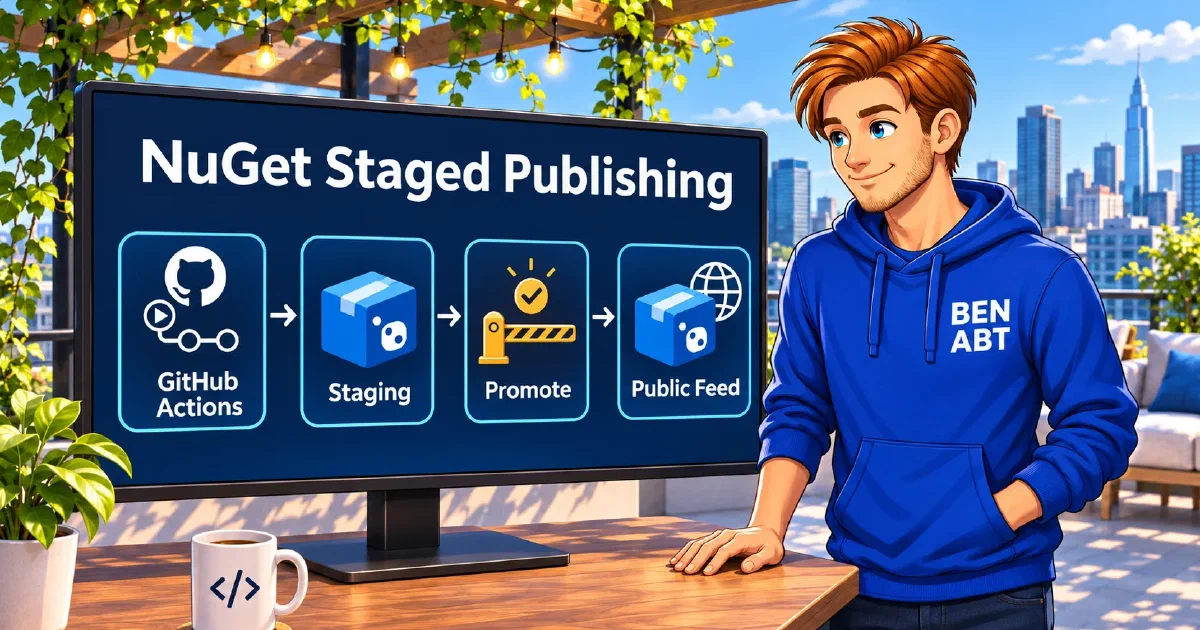
A release can be green in CI and still be early. A library and its hosting integration may be built together while the release notes are still in review. With a regular dotnet nuget push, each accepted upload starts the public publishing process. When both packages are supposed to ship together, the first push already commits the team to part of the release.
NuGet.org now supports staged publishing. A workflow can upload the final package files and let NuGet.org validate them while they remain private. A maintainer reviews the staged packages and starts publication from the website. This moves the release decision to the place that controls public package availability. NuGet.org announcement
What NuGet.org does with a staged package
NuGet.org runs its server-side checks, including malware scanning and signature validation. A package that passes stays in staging until it is promoted or expires. During staging, the version is absent from public search and unavailable to restore, including for the package owner. An unlisted version that has already been published can still be restored by its exact version. A prerelease suffix describes the version and how consumers select it once it is public. Staged publishing on NuGet.org , NuGet package versioning
The website can hold individual staged packages or collect them in a staging group under a user or organization account. Access follows that staging owner, which matters when package ownership is shared. A release group makes it possible to review package IDs, versions and validation status together before approving publication. NuGet.org staging groups and permissions
Test the packages that will be uploaded
Consider a small telemetry library with two packages. HarborTrace.Core contains the event model and HarborTrace.Hosting contains the integration. The hosting project has a project reference to Core. When packed for release 1.4.0, that reference becomes a NuGet dependency on Core.
A test using project references can pass even when the output folder is missing the Core package. A separate console project under tests/PackageSmoke references only the Hosting package. The square brackets in its package reference require the exact version being released. NuGet version ranges
1<Project Sdk="Microsoft.NET.Sdk">
2  <PropertyGroup>
3    <OutputType>Exe</OutputType>
4    <TargetFramework>net10.0</TargetFramework>
5  </PropertyGroup>
6  <ItemGroup>
7    <PackageReference Include="HarborTrace.Hosting" Version="[$(ReleaseVersion)]" />
8  </ItemGroup>
9</Project>
In this example, TraceEvents.Create is a Hosting API that returns a TraceEvent from Core. Calling it from Program.cs checks that the consumer can compile and run against both packed assemblies.
1using System;
2using HarborTrace.Core;
3using HarborTrace.Hosting;
4
5TraceEvent traceEvent = TraceEvents.Create("startup");
6if (traceEvent.Name != "startup")
7{
8    throw new InvalidOperationException("The hosting API did not preserve the event name.");
9}
The smoke test restores from the folder that contains the two .nupkg files. It uses a fresh packages directory so a cached copy of Core cannot hide a missing artifact. This example assumes both packages have no external NuGet dependencies. A project with external dependencies needs an approved source for them and can use Package Source Mapping to keep the release packages tied to the local folder. NuGet Package Source Mapping
Stage the release with NuGet Trusted Publishing
The workflow authenticates exclusively through NuGet Trusted Publishing. GitHub provides an OpenID Connect (OIDC) token, and NuGet.org checks it against a staging-only policy. The job can upload release candidates, and public promotion requires an authorized maintainer on NuGet.org. NuGet Trusted Publishing , Staging-only permissions
The example uses .github/workflows/stage-nuget.yml and a release tag such as v1.4.0. The pack job builds and tests the libraries with the .NET 10 SDK. The staging job uses the .NET 11 SDK for the upload, so libraries targeting the current LTS can use the same release process.
The NuGet.org Trusted Publishing policy belongs to the account or organization that owns the release, points to the repository and the workflow file stage-nuget.yml, and is restricted to staging. The GitHub repository variable NUGET_USER contains the public NuGet.org profile name. The account and repository setup are covered in .NET NuGet Trusted Publishing with GitHub Actions
.
NuGet/login exchanges the OIDC token for a short-lived credential during the run. NuGet calls this credential an API key, and the .NET CLI reads it from NUGET_API_KEY. The example uses the login step’s output directly and requires no API key in GitHub Secrets. NuGet Trusted Publishing credential exchange
 1name: Stage NuGet release
 2
 3on:
 4  push:
 5    tags:
 6      - 'v*'
 7
 8permissions: {}
 9
10jobs:
11  pack:
12    runs-on: ubuntu-latest
13    permissions:
14      contents: read
15    steps:
16      - uses: actions/checkout@v7
17      - uses: actions/setup-dotnet@v6
18        with:
19          dotnet-version: '10.0.404'
20
21      - name: Pack release and run package smoke test
22        shell: bash
23        run: |
24          version="${GITHUB_REF_NAME#v}"
25
26          dotnet pack src/HarborTrace.Core/HarborTrace.Core.csproj \
27            -c Release -p:PackageVersion="$version" -o ./artifacts
28          dotnet pack src/HarborTrace.Hosting/HarborTrace.Hosting.csproj \
29            -c Release -p:PackageVersion="$version" -o ./artifacts
30
31          smoke_project=tests/PackageSmoke/PackageSmoke.csproj
32          dotnet restore "$smoke_project" -p:ReleaseVersion="$version" \
33            --source "$PWD/artifacts" --packages "$RUNNER_TEMP/harbortrace-restore"
34          dotnet run --project "$smoke_project" -c Release --no-restore \
35            -p:ReleaseVersion="$version"
36
37      - uses: actions/upload-artifact@v7
38        with:
39          name: nuget-packages
40          path: artifacts/*.nupkg
41          if-no-files-found: error
42
43  stage:
44    needs: pack
45    runs-on: ubuntu-latest
46    permissions:
47      id-token: write
48    steps:
49      - uses: actions/setup-dotnet@v6
50        with:
51          dotnet-version: '11.0.100'
52      - uses: actions/download-artifact@v8
53        with:
54          name: nuget-packages
55          path: artifacts
56
57      - name: Sign in to NuGet.org with OIDC
58        id: nuget_oidc
59        uses: NuGet/login@v1
60        with:
61          user: ${{ vars.NUGET_USER }}
62
63      - name: Stage release packages
64        shell: bash
65        env:
66          NUGET_API_KEY: ${{ steps.nuget_oidc.outputs.NUGET_API_KEY }}
67        run: |
68          for package in ./artifacts/*.nupkg; do
69            dotnet package stage push "$package" \
70              --source https://api.nuget.org/v3/index.json \
71              --group "harbortrace-${GITHUB_REF_NAME#v}"
72          done
Only the staging job requests an OIDC token. It uploads the files that passed the smoke test. The first upload to harbortrace-1.4.0 creates the group if needed. A successful job means NuGet.org accepted the uploads for staging. Server-side validation can still be in progress. If the second upload fails, the first may already be in the group. The group membership is the starting point for a retry. NuGet.org CLI staging behavior
Approve the group and verify public restore
On NuGet.org, the maintainer checks that the group contains both expected packages at 1.4.0 and that both passed validation. Promote group starts publication for the set. Promotion takes place on the website and requires an authorized account with two-factor authentication enabled. NuGet.org promotion requirements
The packages move through public distribution independently. If Hosting becomes available before Core, a consumer can see the new Hosting version and still get a restore error because its dependency has yet to arrive. Before announcing the release, the maintainer can restore the smoke project against NuGet.org alone with an empty packages directory and verify that both resolved versions in obj/project.assets.json are 1.4.0. NuGet.org group promotion and distribution
Related articles

- 15 min read
.NET NuGet Trusted Publishing with GitHub Actions
Publishing NuGet packages has traditionally required one uncomfortable compromise: a long-lived API key had to exist somewhere in the …
- 12 min read
Managed Identity in .NET: Stop Using Connection Strings
A credential-bearing connection string makes the first Azure request easy and every later security task harder. The same account key or …

- 16 min read
Production Rate Limiting in ASP.NET Core
Most ASP.NET Core rate-limiting examples stop after registering a fixed window. That is enough to demonstrate the middleware, but it is not …

BEN ABT
Ben is Chief Engineering Officer and Principal Software Engineer at Medialesson.de, with a strong focus on .NET and Microsoft Azure. In his professional role, he designs and builds highly scalable platforms for hybrid and cloud-based scenarios. He also advises companies and C-levels on migrating to the sovereign cloud.
He runs myCSharp.de, the largest and most active German-speaking C# community forum, actively contributes to both his own and external open-source projects and regularly shares his knowledge through his blog, at community events, conferences and as a writer for technical magazines.
Let's Work Together
Looking for an experienced Platform Architect or Engineer for your next project? Whether it's cloud migration, platform modernization or building new solutions from scratch - I'm here to help you succeed.