
Code formatting is a very important element when developers work together on a project - and you are always well advised not to invent your own formatting rules, but to use those that are a standard or de facto standard in the respective programming language.
In C#, many rules are now controlled via the editorconfig
, but there is still a lack of standardized formatting tools in .NET - dotnet format simply does not support many things - so that different functionalities exist in different IDEs (Visual Studio
, Visual Studio Code, Rider).
Visual Studio
In Visual Studio, formatting options are not applied automatically by default, but you have to use cleanup profiles to define which rules are to be applied.
These can be accessed via Analyze -> Code Cleanup -> Configure:
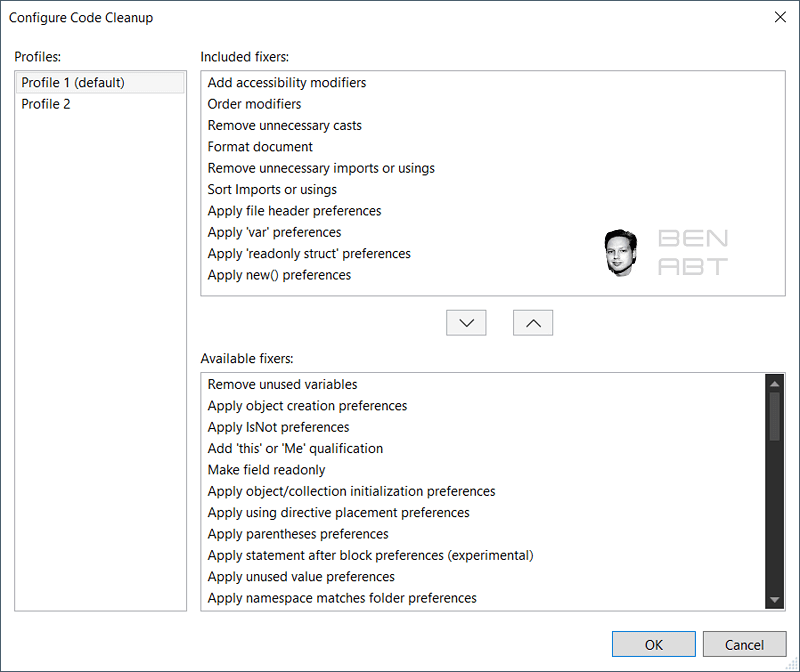
In my case, I have activated the following options that are important for me and for us:
| Option | Description |
|---|---|
| Add accessibility modifiers | Adds missing modifiers such as public or private |
| Order modifiers | Sorts the modifiers in the correct order |
| Remove unnecessary casts | Removes unnecessary casts that make the code more cumbersome to read |
| Format document | Formats the document correctly using tabs, whitespaces and the corresponding brackets |
| Remove unnecessary imports and usings | Removes usings that are no longer needed, e.g. due to refactoring |
| Sort Imports and usings | Sorts all usings |
| Apply file header preferences | Adds or updates file headers if they are optionally stored in the editorconfig |
| Apply var preferences | In my case, replaces all var definitions with the correct type |
| Apply readonly struct preferences | Adds a readonly to all corresponding structs where it makes sense and is necessary (almost always) |
| Apply new() preferences | Turns a Class c = new Class() into a Class c = new(); |
All options mentioned here are my settings. The Code Cleanup uses the Visual Studio Config and the editorconfig .
Activate Code Cleanup on Save
The automatic Code Cleanup is executed every time you save (CTRL+S), which costs a little performance if many open files are saved at the same time. However, if you have a sufficiently powerful computer, you should definitely activate this - it saves a lot of work.
This can be activated in the Visual Studio options under Text Editor -> Code Cleanup and then check the box and select the profile.
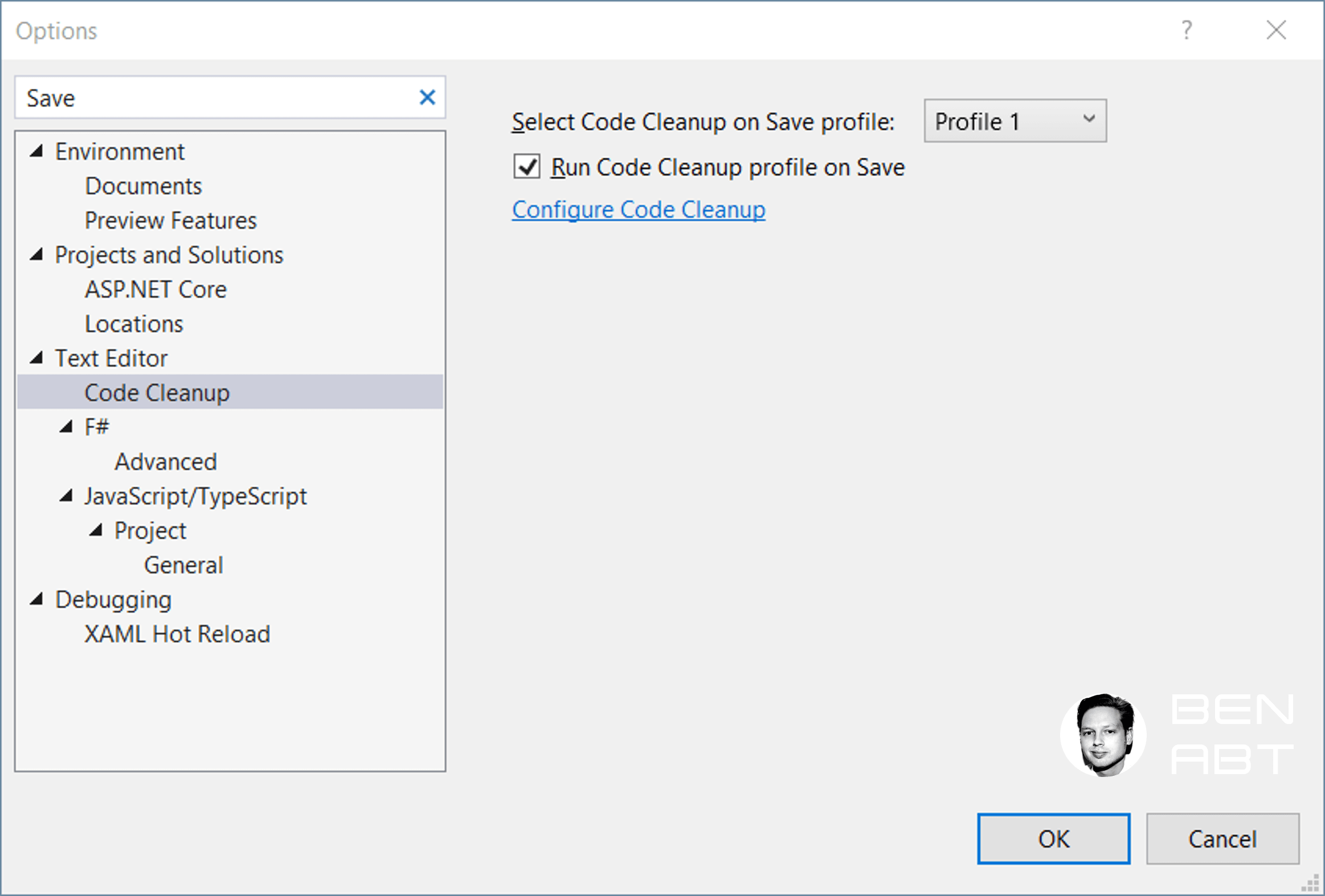
The code is formatted each time it is saved - which makes life much easier.
Related articles

- 16 min read
Production Rate Limiting in ASP.NET Core
Most ASP.NET Core rate-limiting examples stop after registering a fixed window. That is enough to demonstrate the middleware, but it is not …

- 11 min read
The Big Decimal Bugfix with .NET 11
For more than two decades, (decimal)1.23 returned 1.23m. It looked correct, it passed every test and it was a polite lie.

- 10 min read
Distroless, Chiseled or Alpine: Choosing a .NET Base Image
Distroless, Chiseled and Alpine are often compared as three equivalent Linux distributions. They are not. Alpine is a distribution built …

BEN ABT
Ben is Chief Engineering Officer and Principal Software Engineer at Medialesson.de, with a strong focus on .NET and Microsoft Azure. In his professional role, he designs and builds highly scalable platforms for hybrid and cloud-based scenarios. He also advises companies and C-levels on migrating to the sovereign cloud.
He runs myCSharp.de, the largest and most active German-speaking C# community forum, actively contributes to both his own and external open-source projects and regularly shares his knowledge through his blog, at community events, conferences and as a writer for technical magazines.
Let's Work Together
Looking for an experienced Platform Architect or Engineer for your next project? Whether it's cloud migration, platform modernization or building new solutions from scratch - I'm here to help you succeed.