
For many years, there has been a lot of criticism of Visual Studio’s current solution format. It is very difficult to read, it does not follow any standard and you need your own parser. Changes are virtually only possible with Visual Studio - and there are constant merge problems.
Microsoft has now tackled the problem and developed a new format based on XML. It is easier to read, follows this XML standard and can also be edited without Visual Studio. The new format is currently being introduced as a preview in Visual Studio 2022 v17.10 and must be activated manually in the options.
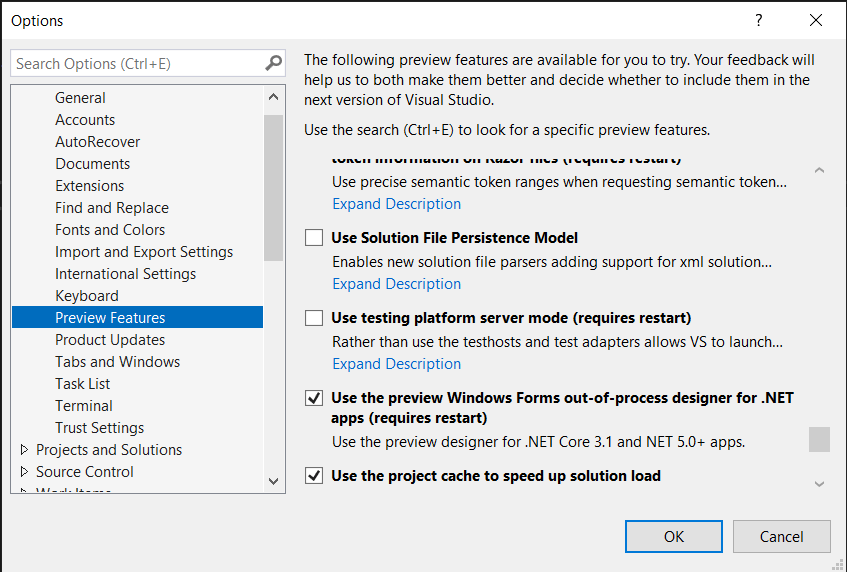
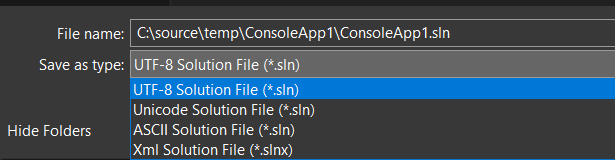
After activating the preview feature “use solution file persistence model”, the file can be created by clicking “Save as…”.
As an example, here is a current solution file that contains two projects:
 1
 2Microsoft Visual Studio Solution File, Format Version 12.00
 3# Visual Studio Version 17
 4VisualStudioVersion = 17.9.34407.89
 5MinimumVisualStudioVersion = 10.0.40219.1
 6Project("{FAE04EC0-301F-11D3-BF4B-00C04F79EFBC}") = "ConsoleApp1", "ConsoleApp1\ConsoleApp1.csproj", "{D5991777-2F40-49C9-BB75-78228CB25021}"
 7EndProject
 8Project("{2150E333-8FDC-42A3-9474-1A3956D46DE8}") = "Solution Items", "Solution Items", "{2BDE57F7-2328-4C85-998C-DE491FB76CFE}"
 9	ProjectSection(SolutionItems) = preProject
10		Directory.Build.props = Directory.Build.props
11	EndProjectSection
12EndProject
13Project("{FAE04EC0-301F-11D3-BF4B-00C04F79EFBC}") = "ClassLibrary1", "ClassLibrary1\ClassLibrary1.csproj", "{F1E36EA1-B227-4311-BA97-DFFFD7B3D777}"
14EndProject
15Global
16	GlobalSection(SolutionConfigurationPlatforms) = preSolution
17		Debug|Any CPU = Debug|Any CPU
18		Release|Any CPU = Release|Any CPU
19	EndGlobalSection
20	GlobalSection(ProjectConfigurationPlatforms) = postSolution
21		{D5991777-2F40-49C9-BB75-78228CB25021}.Debug|Any CPU.ActiveCfg = Debug|Any CPU
22		{D5991777-2F40-49C9-BB75-78228CB25021}.Debug|Any CPU.Build.0 = Debug|Any CPU
23		{D5991777-2F40-49C9-BB75-78228CB25021}.Release|Any CPU.ActiveCfg = Release|Any CPU
24		{D5991777-2F40-49C9-BB75-78228CB25021}.Release|Any CPU.Build.0 = Release|Any CPU
25		{F1E36EA1-B227-4311-BA97-DFFFD7B3D777}.Debug|Any CPU.ActiveCfg = Debug|Any CPU
26		{F1E36EA1-B227-4311-BA97-DFFFD7B3D777}.Debug|Any CPU.Build.0 = Debug|Any CPU
27		{F1E36EA1-B227-4311-BA97-DFFFD7B3D777}.Release|Any CPU.ActiveCfg = Release|Any CPU
28		{F1E36EA1-B227-4311-BA97-DFFFD7B3D777}.Release|Any CPU.Build.0 = Release|Any CPU
29	EndGlobalSection
30	GlobalSection(SolutionProperties) = preSolution
31		HideSolutionNode = FALSE
32	EndGlobalSection
33	GlobalSection(ExtensibilityGlobals) = postSolution
34		SolutionGuid = {CB456CB7-F491-48D5-B012-38A64C9AF96E}
35	EndGlobalSection
36EndGlobal
As you can see, the file is very large, very bloated with unnecessarily duplicated information - and, at first glance, lacks structure.
Here is exactly the same solution with the new solution file.
1<Solution>
2  <Folder Name="/Solution Items/">
3    <File Path="Directory.Build.props" />
4  </Folder>
5  <Project Path="ClassLibrary1\ClassLibrary1.csproj" />
6  <Project Path="ConsoleApp1\ConsoleApp1.csproj" />
7</Solution>
The 35 lines have been reduced to just 7 lines. The file is much easier to read and understand as it follows the XML standard.
Huge improvement!
Please note
There is currently no option in the .NET CLI. However, it is planned that the new format will also be supported in the .NET CLI in the future - currently it is a pure preview and should not be used in productive environments.
Nevertheless, please try out the new file and give Microsoft feedback!
Related articles

- 14 min read
.NET 8 makes you faster. Everyday.
As has been the case for many releases, the .NET 8 team is spending a lot of development effort to improve the .NET Runtime in terms of …
- 2 min read
Accelerate your .NET build with Visual Studio 2022
A little more than three months ago, Microsoft integrated a new functionality into Visual Studio 2022: Build Acceleration . This mechanism, …

- 16 min read
Production Rate Limiting in ASP.NET Core
Most ASP.NET Core rate-limiting examples stop after registering a fixed window. That is enough to demonstrate the middleware, but it is not …

BEN ABT
Ben is Chief Engineering Officer and Principal Software Engineer at Medialesson.de, with a strong focus on .NET and Microsoft Azure. In his professional role, he designs and builds highly scalable platforms for hybrid and cloud-based scenarios. He also advises companies and C-levels on migrating to the sovereign cloud.
He runs myCSharp.de, the largest and most active German-speaking C# community forum, actively contributes to both his own and external open-source projects and regularly shares his knowledge through his blog, at community events, conferences and as a writer for technical magazines.
Let's Work Together
Looking for an experienced Platform Architect or Engineer for your next project? Whether it's cloud migration, platform modernization or building new solutions from scratch - I'm here to help you succeed.